• The forum upgrades have been completed. These were moderate security fixes from our software vendor and it looks like everything is working well. If you see any problems please post in the Forum Technical Support forum or email us at forum_moderator (at) aawforum.org. Thank you
  • February 2026 Turning Challenge: Cookie Jar! (click here for details)
  • Congratulations to Chad Eames for "Red Tines" being selected as Turning of the Week for February 23, 2026 (click here for details)
  • AAW Symposium demonstrators announced - If the 2026 AAW International Woodturning Symposium is not on your calendar, now is the time to register. And there are discounts available if you sign up early, by Feb. 28. Early Bird pricing gives you the best rate for our 40th Anniversary Symposium in Raleigh, North Carolina, June 4–7, 2026. (There are discounts for AAW chapter members too) For more information vist the discussion thread here or the AAW registration page
  • Welcome new registering member. Your username must be your real First and Last name (for example: John Doe). "Screen names" and "handles" are not allowed and your registration will be deleted if you don't use your real name. Also, do not use all caps nor all lower case.

Fred Slifer

Hello Fred, welcome aboard.
 
FRED SLIFER
New member, Glenside Pa
Just trying to learn about posting and trying this Introductions Fourm

FRED SLIFER
New member, Glenside Pa
Just trying to learn about posting and trying this Introductions Fourm
Hello Rick. So glad to see a familiar name. Thank you for responding. Trying to finish my introduction post with a photo or two but it seems my photos all exceed the pixel size limits. Very frustrated.... not good with computer stuff, and probably not worth my time. BUT, then I see you have a photo on your account ....How did you do that? Did you somehow reduce the pixel size?
 
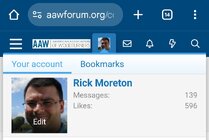
Hi Fred! To add a profile picture you need to click on your profile near the top. Then you can click edit and change the picture. Here is what I see on my phone, it might look a little different on a desktop computer.

1000009396.jpg
 
Last edited:
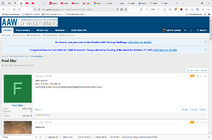
This is what I see on my laptop, iPad, or desktop computer.

I replied to your other thread on what to click on to add an Avatar photo and how to post photos in a message.

JKJ

1761949110918.png
 
Back
Top