
- Joined
- Jan 27, 2005
- Messages
- 13,232
- Likes
- 5,864
- Location
- Dalworthington Gardens, TX
- Website
- pbase.com
Conversations are the equivalent of Private Messages in the old vBulletin forum. Here is one way to start a new conversation.
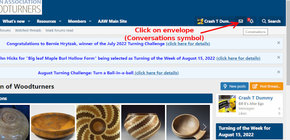
Click on the envelope (Conversations symbol) as shown in the figure below.
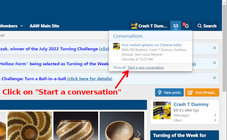
... and then you will get a drop-down menu as shown below. Click on "Start a new conversation".
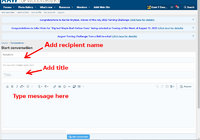
... The Conversations form will appear. Add the name of a recipient (you can add more than one recipient). Add a title for the conversation. Type your message. and lastly click on the blue "Start conversation" button.
*****************************************************************************************************
Alternatively, you can start a conversation by clicking on the person's avatar or their name below the avatar as shown below.
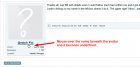
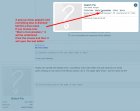
This will open the same text editor box as shown in the previous method ...
EDIT: Revised on August 22, 2022, because of a forum software update.
Click on the envelope (Conversations symbol) as shown in the figure below.
... and then you will get a drop-down menu as shown below. Click on "Start a new conversation".
... The Conversations form will appear. Add the name of a recipient (you can add more than one recipient). Add a title for the conversation. Type your message. and lastly click on the blue "Start conversation" button.
*****************************************************************************************************
Alternatively, you can start a conversation by clicking on the person's avatar or their name below the avatar as shown below.
This will open the same text editor box as shown in the previous method ...
EDIT: Revised on August 22, 2022, because of a forum software update.
Last edited: