As you are using the forum, you may notice a couple of things when you are logged in.
1) Messages which show up in bold are those messages which you have not yet read. In other words, someone posted new content since you last visited the forum. The bold highlighting just shows those updated threads.
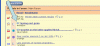
In the picture below, 2 messages show up in bold. Those are new messages. The 2 messages below them show up as non-bold, indicating that you have already read all the content in those messages.
2) Those same messages have a little symbol next to them. It is a downward pointing arrow next to the message title. This downward pointing arrow is indicated in the picture below. If you click on that little symbol it will take you to the first unread message in that discussion thread. It's a handy way to get to the newest content in each message.
Hope this helps.
1) Messages which show up in bold are those messages which you have not yet read. In other words, someone posted new content since you last visited the forum. The bold highlighting just shows those updated threads.
In the picture below, 2 messages show up in bold. Those are new messages. The 2 messages below them show up as non-bold, indicating that you have already read all the content in those messages.
2) Those same messages have a little symbol next to them. It is a downward pointing arrow next to the message title. This downward pointing arrow is indicated in the picture below. If you click on that little symbol it will take you to the first unread message in that discussion thread. It's a handy way to get to the newest content in each message.
Hope this helps.