Is it possible to use a laser engraver on the outside of a bowl, in other words, on a curved surface?


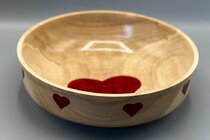
The big advantage of the LatheEngraver for doing laser or router work around the rim of the bowl is that you can rotate your tool to be normal to the surface of the workpiece. Additionally, the way I have written the control software you can use any 3-axis gcode from your favorite CAM package (Vectric, LightBurn, etc.). You input the diameter of the workpiece where your design will be centered and it will do all the necessary coordinate modifications (and it is free).Yes, but you would typically want a rotary attachment to have it work well (this is what they use for engraving tumblers). You would be limited in diameter with the rotary attachment depending on the style and also the laser setup itself. You could also checkout https://transpirationturning.com/ for doing this at the lathe. Paul Paukstelis has some posts on this.
o directly answer your question, yes it’s possible. There is a certain amount of tolerance on how out of focus the laser can get before you loose clarity in the work.

Most basic CAM packages aren't going to have the necessary tools to generate this gcode. Those that are designed for generating laser gcode almost certainly aren't (they might have basic rotary at best).Again, this depends on machine you're using. With a CNC router the laser head moves vertically (Z axis) to maintain the focal distance.
Here's a random image I found online. Think of this as a surface you might want to laser engrave. The highs and lows might exceed the focal length of your laser so the laser head has to move up/down to compensate for surface irregularity.
Vectric's Desktop at $349 will do it. Some CNC routers sold at Woodcraft include Desktop. Desktop also supports a rotary 4th axis. Vectric software is very widely supported, hundreds of Youtube videos.Most basic CAM packages aren't going to have the necessary tools to generate this gcode. Those that are designed for generating laser gcode almost certainly aren't (they might have basic rotary at best).
The other problem you run into is that the Z travel on a hobby machine is likely to be fairly limited. Assuming you are on a rotary setup (which itself takes up some Z travel unless you are build a drop table) you may not be able to reach either the rim or the base of the bowl.
That's all it takes? It is baffling that thousands of turners aren't using these simple steps to embellish their bowls. You only need to use three pieces of software and a deep understanding of gcode to make it work.Here's how I would do it using Desktop. Desktop includes quite a collection of free clipart. That clipart can be manipulated (stretched, resized, distorted, etc, etc) to create a 3D surface or wrapped on a circular work piece. Design your laser path as a 2D file using the design tools in Desktop. Then using the project cutter path option onto the 3D surface. The Gcode generated will be a cutter path. The cutter path is easy to modified to a laser path by using search and replace in free Notepad++. Then use another free software to modify the Gcode to raise the laser head in Z axis to the correct focal length off the 3D surface.

 By the way Doug if you know a way to adapt a laser to the Shark 510 HD I'd be grateful.