• It's time to cast your vote in the December 2025 Turning Challenge. (click here for details)
  • Congratulations to Pat White for "Sicilian Mosaic" being selected as Turning of the Week for December 29, 2025 (click here for details)
  • Welcome new registering member. Your username must be your real First and Last name (for example: John Doe). "Screen names" and "handles" are not allowed and your registration will be deleted if you don't use your real name. Also, do not use all caps nor all lower case.

Segmented vase with curved compound miter joints

Joined
Dec 26, 2025
Messages
11
Likes
15
Location
Raleigh, NC
I'm new to the forums, so apologies if I'm in the wrong place. If this belongs in off-topic I'll have to wait a month tp get "established" šŸ˜‚
I spent some time yesterday reading all the threads I could find that mentioned CNC. Most focused on decorating bowls after turning. Some discussed whether using a CNC is "cheating". I freely admit to being a CNC guy who cheats by using a lathe!
I wrote my own software early this year to easily sketch a stave-segmented vase with curved joints. The software creates a 3d model for a single stave. I import the model into my CNC software and cut the required number of staves. After the staves are glued together I turn the vase on the lathe.
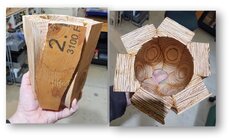
What I'd like to go through is the making of my prototype. Going in I fully expected the process to fail in some way and I'd go back to the drawing board. I needed some thick wood for the staves, and didn't want to sacrifice anything nice. My daughter was having a house built, and I rescued some 2" thick LVL scraps from the dumpster (laminated veneer lumber, used for engineered beams). Crappy stuff for turning, but heck it's just a proof of concept right? Instead it ended up being a really nice keepsake "made from the house".
At this point I'll tease the end result, and if folks are interested I'll add step-by-step posts. My ultimate goal is to share the process and my software with others, though obviously a CNC machine is required. If there are other geeks out there who'd like to collaborate on developing the process further, even better!
 

Attachments
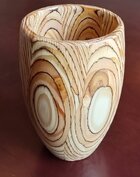
  • finished vase.jpg
    finished vase.jpg
    161.9 KB · Views: 47
  • finished bottom.jpg
    finished bottom.jpg
    277.6 KB · Views: 48
Last edited:
Hi Bob ... great stave/CNC project and with the bonus of the personal connection to the piece !! I've been wanting to explore integrating turning and CNC work for awhile and finally pulled the trigger on a Sienci Altmill 4x4 CNC machine last month. Just got it the other day and still in the setup process. Have been woodworking and turning on/off for most of 50+ years along with a 40+ yr software development career .... but new to the world of CNC.

Would love to see your plans/files/etc. and collaborate on things once I get my feet wet with this new (to me) endeavor.
 
Cool piece! Yes, CNC might seem like cheating, but it does open so many possibilities. I guess if money were not a limiting factor and I could learn the programming part of it, I could see having one, but until then, (neither of which is likely) I'll remain a "purist" woodturner.

As I falling asleep last night, I was pondering what a segmented piece with compound cuts might look like. The curvature of the piece combined with angled cuts might make some interesting curves.
 
OK, step 1 for this project was to sketch the design of the vase in my program. I named the program "Vazier" because:
1. That sounds to me like a guy who makes vases.
2. I use beziers to draw the shape of the vase.

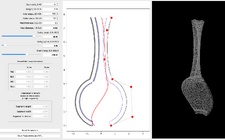
My goal was to make Vazier easy enough for non-technical folks to figure out and use, so it needed a GUI. My artist wife Marie was my beta tester. This screen shot is the design she drew:

vazier.png

The left panel has controls to set the number of segments (staves), overall height, wall thickness, and diameter of the vase, and the resolution of the 3d mesh.
Below that are 3 sliders to control the shape of the curved joint between the staves. The joint is always a sinusoid, but mapped to the surface of the mesh it takes on a nice organic feel. The sliders control the amplitude, frequency and phase of the sinusoid. No need to understand the math, playing with the sliders changes the curve in a way that's intuitive (and fun!)
Next are some stats on the overall dimensions of the vase, and the material dimensions required to machine an individual stave. If you have material you want to use for the staves, you need to make sure the model fits the material dimensions.
The dimensions are updated with every design change.
Finally there are buttons to read and save parameters, so you can get back to where you were. Saving also writes an STL file for the mesh. The STL file will get imported into the CAD/CAM software for the CNC.

The center panel is the sketch itself. You can drag any of the red dots to change the shape. If you've ever used Illustrator, Inkscape, CorelDraw etc. the bezier work the same.

The right panel displays 3d a model of a single stave as a wireframe mesh. All changes made in the control and sketch panes are immediately reflected in the mesh pane. The mesh can be zoomed and rotated in 3 dimensions.

Here's a video screenshot of me playing with the Vazier interface.

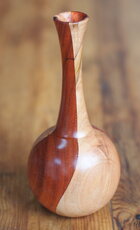
This is the vase made from Marie's design. I cut 2 staves from padauk and 2 from ambrosia maple. The final wall thickness is a uniform 5/16". I didn't need to turn the inside at all except for the visible opening at the top. Which is good, because there's now way in heck I could have hollowed that thing! The entire outside was tuned and finished on the lathe. Nice design Marie!
long neck vase.JPG

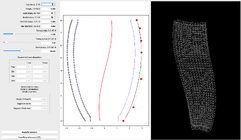
The actual design for my LVL vase is a lot more boring. Hey, remember I'm an engineer and it was supposed to be just a prototype!
LVL vase.png

In the next post I'll import the 3d model of this stave into Vectric Aspire, and prepare it for machining on the CNC.
 
Thanks Steve! I looked up Sienci and your machine looks really awesome. I love the closed-loop motor system, no losing track of position when something stalls! What software will you be using? I have Vectric Aspire.
Starting out with Vectric Desktop software but see myself upgrading to the Pro version probably sooner than later, Aspire may be a ways off ... at least for now. Opted for their gControl Panel Computer and also went with their 2.2kw, 220V spindle ... the ol' Buy Once Cry One thing kicked in (at least hardware wise).

Up to this point I've mainly thought of doing hybrid CNC/Turning along the lines of "embellishment" ... maybe glue up just a segmented top ring for a bowl, lay it flat to CNC carve a design, words, etc. into that, maybe epoxy fill and then glue that top ring to the rest of the bowl before turning. I've seen vids where people have used a CNC Rotary Axis attachment to turn spindles but wasn't that impressed I guess since that's what a lathe is for IMHO šŸ¤”. Then again some have cut a trap door in the bed of their machine to machine larger pieces vertically and or mount a rotary axis in. Lots of possibilities out there.
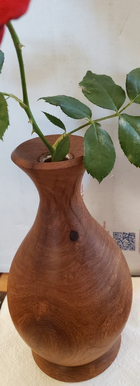
Your Mr. "Vazier" app looks pretty cool .. hats off to you and Marie !! Turned out to be very nice vase. One of the things I've done when turning bud vases is to bore a 3/4" hole down the neck with a little recess at the top to accept a glass test tube ... just a thought.
 

Attachments

  • Bud Vase.PNG
    Bud Vase.PNG
    843.4 KB · Views: 4
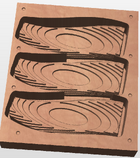
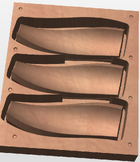
OK, time for step 2: Cut the staves on the CNC

This step is less interesting if you don’t either have a CNC or plan to get one. You can skim it to get the idea, but don’t be intimidated, it’s not as hard as it looks.
If you do have a CNC, I’m going to assume you have at least some experience with it; a detailed step-by-step would be way too much for this follow-along. I’ll hit a few milestones specific to this project.
The details are also somewhat specific to my machine (ShopBot Desktop) and CAD/CAM software (Vectric Aspire). The ShopBot is similar enough to most of the hobbyist CNCs you can find at places like Woodcraft and Rockler (Shark etc). They usually come with VCarve Desktop, which I believe should work the same as Aspire for this project.

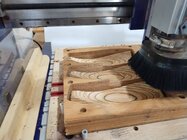
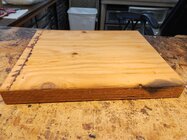
I already knew I wanted to use scraps of 1-3/4" thick engineered lumber for this project. I had several pieces in widths of 11-3/4ā€ and 14ā€, and lengths up to about 2’. I designed this vase with 6 staves.

lumber.jpg

At the end of step 1, Vazier told us each of the 6 staves would need a piece approximately 8ā€ x 3.426ā€ x 2.126ā€. It’s approximate because it assumes the stave will be cut with the axis of the vase parallel to the machine bed, and the length parallel to the X axis (usually along the gantry). I guessed by looking at the profile in Vazier that the thickness was conservative, because each side ā€œleaned outā€ from the center. That’s oversimplified because the stave is a complex 3D shape, but the actual import later confirmed a stave fits in my 1.75ā€ material.

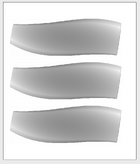
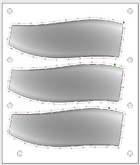
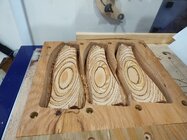
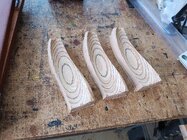
I decided to cut 3 staves at a time. I could have fit all 6 on a single piece of LVL, but figured the first 3 would let me test the fit of the joints before doing the rest.

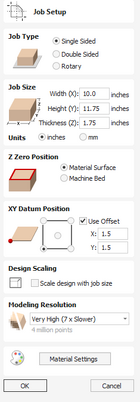
I created a new Design in Vectric with the following material setup:

material setup.png

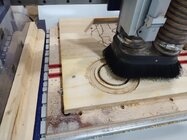
The job is single sided because I'm only going to machine the ā€œinsideā€ surface of the stave. The inside includes the miter joints and the inner surface. The curved miter joints are the whole point of the project, and letting the CNC machine the inner surface means I won't have to hollow on the lathe. I could machine the outside as well, but that's much easier and better on the lathe.
The job size is the dimensions of my scrap of LVL.
The XY Datum Position is the corner I index to on my spoilboard. I like to use PEX pegs for alignment.
I set the modeling resolution to Very High, which is probably overkill. I never really notice much slowdown.

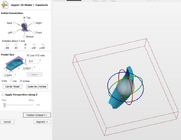
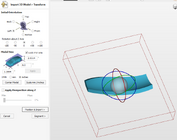
Now we need to import and position the 3d model. Vazier modeled the vase standing up, but we need to cut the staves lying down.

import 1.png

import 2.png
 
Last edited:
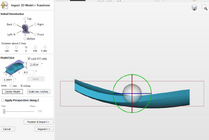
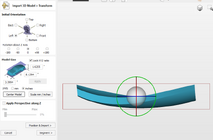
We can also tweak the rotation to fit our 2.126ā€ thick model in our 1.75ā€ thick material. To do this I rotate the view to "Front" and turn off perspective, then turn the green ring slightly left.

import 3.png

import 4.png

If the model is too thick to fit the material regardless of rotation, we could import again and scale it down, or go back to Vazier and change the size. I like to keep Vazier consistent with the final piece.
Otherwise we complete the import and go to the 2d View. There we can make copies of the model, and put a vector boundary around them for a cutout profile. I also like to put hold down screw holes in my design, to avoid breaking bits on screws I was SURE were not in the way.

2d 1.png2d 3.png
 
Last edited:
šŸæ ... in my quest of learning CNC with reading and watching countless videos (without having even run one job yet ) and also never having done a stave project🤪, that said ... could the toolpaths for the

inside surface be eliminated and have the carve just cut the curved profile and glue joints ? Say maybe for more of a curved stave bowl shape allowing for traditional hollowing of the inside ?
Then again ... it's already on the CNC so might as well just carve it out (?)
Wondering what the time is for running all toolpaths for one stave.

BTW .. read in your intro that you worked at IBM ... spent my entire 39 yr career with them starting in Endicott NY, then Austin TX for 10 yrs, then 6 yrs from home in AZ before retiring.
 
Third and final chapter - glue-up and turning!
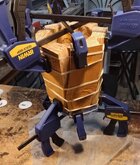
After cutting the first 3 staves I was pleased with the fit of the joints. The curved miters were somewhat self-aligning... it was easy to tell when they mated up correctly. I made the last 3 staves and glued them together. Some rubber bands and three clamps at each end held everything together nicely.

1 clamped.jpg

When I took the clamps off I started to realize this prototype might actually be a keeper. It looked pretty rough on the outside, and I was still nervous about how the LVL would turn, but looking inside and seeing the peacock feather pattern made me smile!
2 glued.jpg
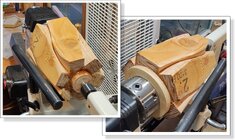
I hadn’t really given any thought to how I was going to plug the hole in the bottom. But I knew the exact diameter of the hole, and I had a bezier curve for the inside surface profile from Vazier. So on the CNC I made a plywood disk that fit perfectly inside. I made another disk on the CNC from a scrap of hardwood, with a perfect 7 degree dovetail to fit my bowl jaws. That disk got glued on from the outside, and would be parted off after turning.

3 rings.jpg

While I was at it I made another disk for the top opening, with a rim to keep it centered. This one didn’t get glued in, but it allowed me to support the tailstock end with a live center.
I was pretty confident the glue joints would hold; those curved miters would be near impossible to shear. But I was still a bit worried about the LVL. It was full of voids and knots. I made sure to wear my ā€œspace helmetā€ while turning.

4 lathe.jpg
 
Last edited:
Since the 3d model for the staves ended at the outer edge of the curved miters, I knew that turning down to the glue joint would make the shape exactly what I designed in Vazier. Also the wall thickness would be exactly what I specified. No need to worry about turning through the wall, even though I couldn’t see or feel inside!
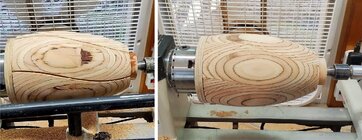
The LVL turned surprisingly well, especially after I got the corners knocked off and cranked up the speed. It only took about 10 minutes to get to the first picture below, close to the glue joints but not quite there. At that point I switched from roughing to nice gentle shear cuts. Another few minutes and I was at the glue. Whew!

5 stop at glue.jpg

I sanded the outside down to 330 grit and followed with Yorkshire grit. This soft wood wasn’t going to get any smoother, but the abrasive wax shined it up a bit.
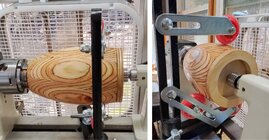
I was a little worried about turning the inside. I’d never done anything this deep before, and I didn’t even have a tool that could reach the bottom easily. I was nervous the little tenon might snap off it I pushed the vase off center. I put a steady rest on the outside before opening up the top to turn inside, so I’d feel a little safer.

6 steadyrest.jpg

Here’s the inside after a couple quick scrapes. I didn’t have to remove much wood, just clean up the glue joints and smooth things off a bit.
Unfortunately, I didn’t take any more pictures on the lathe, but I got the inside looking about as good as the outside. The final wall thickness ended up around 3/8ā€.

7 inside smoothing.jpg

It’s rustic for sure, but that’s fine! It's made from a dumpster beam after all. And the description I engraved on the bottom made it a perfect housewarming gift.

8 done.jpg
 
With a successful first Vazier project under my belt, I went on to make more turnings with curved miters. The 2 with horizontal joints were designed with another piece of code that will eventually get incorporated into Vazier.

9 group.JPG

If anyone else with a CNC would like to try Vazier, I’m happy to share the program. It’s not bug-free, but it’s quite useable. The vase my artist wife Marie designed (front and center) is my favorite so far!
 
Back
Top