• It's time to cast your vote in the December 2025 Turning Challenge. (click here for details)
  • Congratulations to Pat White for "Sicilian Mosaic" being selected as Turning of the Week for December 29, 2025 (click here for details)
  • Welcome new registering member. Your username must be your real First and Last name (for example: John Doe). "Screen names" and "handles" are not allowed and your registration will be deleted if you don't use your real name. Also, do not use all caps nor all lower case.

What’s on your lathe?

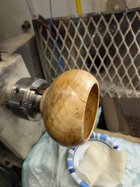
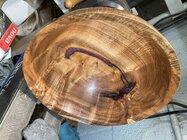
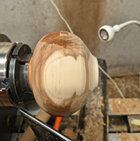
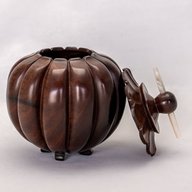
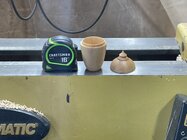
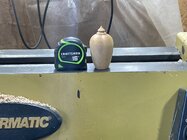
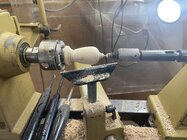
1/2 inch opening is tough freehand (no laser or camera). I’m twice turning this wet camphor so the hole will likely get a bit bigger. Tools, concentration, and steadiness are needed. I’m usually not successful.View attachment 83424
You will knock this out of the park! When second turning are you just touring up the outside and a little on the top of the inside? Or do you second turn the full inside?
 
You will knock this out of the park! When second turning are you just touring up the outside and a little on the top of the inside? Or do you second turn the full inside?
Opening and outside first, then inside. Full inside. Would love to know what others do. On occasion I’ve turned the whole wet piece but don’t like warped hollow forms.
 
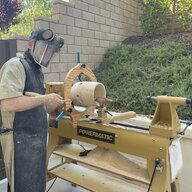
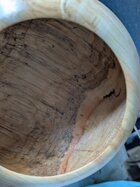
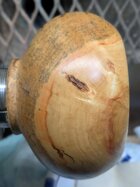
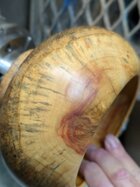
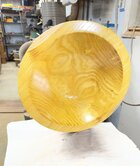
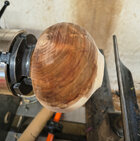
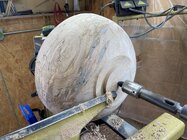
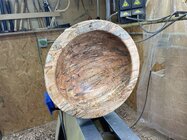
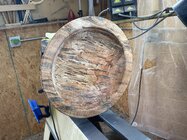
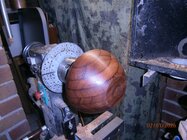
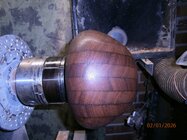
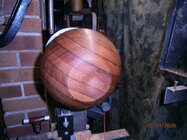
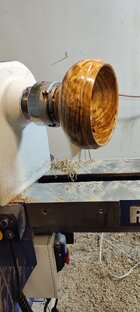
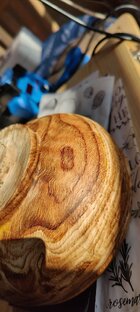
simple boxelder bowl 4.5 x 7.5
It had been sitting waiting to be finish turned and what little flame it had is almost gone.

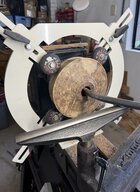
This was a practice piece for the Bosch system. I gotta question the cost of that versus being able to do the inside with regular tools usually, although not as easy.

I know smoothness on the inside isn't as critical on the small openings because who can feel in there?
Am I going to have to buy one of his tear drop scraper tool or other suggestions? Had quite a bit of tear out inside which is par for the course for me with boxelder.
 

Attachments

  • PXL_20251230_003356067.PORTRAIT.jpg
    PXL_20251230_003356067.PORTRAIT.jpg
    325.3 KB · Views: 17
  • PXL_20251230_003342793.PORTRAIT.jpg
    PXL_20251230_003342793.PORTRAIT.jpg
    305 KB · Views: 16
  • PXL_20251230_003408353.PORTRAIT.jpg
    PXL_20251230_003408353.PORTRAIT.jpg
    242.6 KB · Views: 17
  • PXL_20251230_003100810.MP.jpg
    PXL_20251230_003100810.MP.jpg
    246.3 KB · Views: 17
simple boxelder bowl 4.5 x 7.5
It had been sitting waiting to be finish turned and what little flame it had is almost gone.

This was a practice piece for the Bosch system. I gotta question the cost of that versus being able to do the inside with regular tools usually, although not as easy.

I know smoothness on the inside isn't as critical on the small openings because who can feel in there?
Am I going to have to buy one of his tear drop scraper tool or other suggestions? Had quite a bit of tear out inside which is par for the course for me with boxelder.
Yes, you will need scrapers. As you get thinner, carbide is too aggressive. You’ll want a smooth even wall, just won’t need to sand when opening under 3/4 inch. The final smooth wall thickness is—for me—achieved with scrapers.
 
I know smoothness on the inside isn't as critical on the small openings because who can feel in there?
Am I going to have to buy one of his tear drop scraper tool or other suggestions?

The teardrop and other rounded scrapers are invaluable for insides, even if you can't feel to the bottom you can still see it. I want it baby=cheek soft all the way inside (unless the opening is too small for even a little finger.)

I use some of the Sorby scrapers but started making my own shapes from card scrapers. (The only problem is sometimes making the hole for the screw - a drill bit won't cut it. I usually grind a hole with a diamond bit in a Dremel.

I like the thin scrapers for the insides more than the thicker, stock, scrapers.

JKJ
 
Yes, you will need scrapers. As you get thinner, carbide is too aggressive. You’ll want a smooth even wall, just won’t need to sand when opening under 3/4 inch. The final smooth wall thickness is—for me—achieved with scrapers.
I went with Trent bosch's recommendation and got the hss, not the carbide. I just need more practice feeling out the surface with the hollowing tools I'm sure.
 
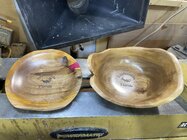
IMG_4254.jpegHave a local art show coming up in couple weeks. I rent a booth usually do pretty well. Display about 25 pieces. Almost all local wood. The large bowl is a piece of tamarind with a little resin where I cut out the rot which has amazing chartoyance and a couple small pieces of buttonwood which also has beautiful grain. I used the Laserpecker to engrave the buttonwood as the tourist love anything that has the locale printed on it
 

Attachments

  • IMG_4252.jpeg
    IMG_4252.jpeg
    634.2 KB · Views: 36
Last edited:
Please tell more. What are your exact steps for posting a photo? The command Posting from a computer, tablet, phone? Did you edit the photos before posting?
From my iPad. I clicked on attach file. The photo was upright when I uploaded it. One photo posted correctly the other flipped upside down for some reason
 
From my iPad. I clicked on attach file. The photo was upright when I uploaded it. One photo posted correctly the other flipped upside down for some reason

Looks to me, when I enlarge the photos, that both posted upside down.

As David mentioned, several have had problems with photos rotated when posting directly from a phone. I looked into the file internals and found a clue then did some tests and found that I could replicate this problem if I used the "Attach files" control at the bottom of a message:
1767196920698.jpeg

However, at least in those cases, the problem went away when I used the "Insert image" control at the top of the message:

1767196977589.jpeg
You might try this and see if it works. You can Edit your message, use "Insert image" on both, check the results, then delete the originals (or the new uploads if it didn't work) by clicking on the little trashcan icon in the thumbnails below the message.

BTW, another quicker way I insert images when using one of my computers is copy/paste - click on the image or name in the Win10 File Explorer, Ctrl-C to copy, put the cursor where I want picture in the message and use Ctrl-V to paste. (iPad uses Cmd instead of Ctrl).
This will put the photo in the message body at a large (or forum maximum) size. I then click on the image and drag one of the blue corner boxes to reduce the image size as I want. This makes it easier to add text above and below, and put several small images beside each other. The viewer can always click on the reduced size image to view the larger size.

JKJ

 
With an iPad, try taking the picture in landscape (camera up), and then attaching the file with the camera up (position it was when you took the picture). Also make sure lock rotation is off.
 
Looks to me, when I enlarge the photos, that both posted upside down.

As David mentioned, several have had problems with photos rotated when posting directly from a phone. I looked into the file internals and found a clue then did some tests and found that I could replicate this problem if I used the "Attach files" control at the bottom of a message:
View attachment 83565

However, at least in those cases, the problem went away when I used the "Insert image" control at the top of the message:

View attachment 83566
You might try this and see if it works. You can Edit your message, use "Insert image" on both, check the results, then delete the originals (or the new uploads if it didn't work) by clicking on the little trashcan icon in the thumbnails below the message.

BTW, another quicker way I insert images when using one of my computers is copy/paste - click on the image or name in the Win10 File Explorer, Ctrl-C to copy, put the cursor where I want picture in the message and use Ctrl-V to paste. (iPad uses Cmd instead of Ctrl).
This will put the photo in the message body at a large (or forum maximum) size. I then click on the image and drag one of the blue corner boxes to reduce the image size as I want. This makes it easier to add text above and below, and put several small images beside each other. The viewer can always click on the reduced size image to view the larger size.

JKJ

Bingo! Thank you John!! Happy New Year to all!!
 
Back
Top