• December 2025 Turning Challenge: Single Tree! (click here for details)
  • Congratulations to Bob Henrickson, People's Choice in the November 2025 Turning Challenge (click here for details)
  • Congratulations to Steven Gordon for "Dropped Ice Cream Cone" being selected as Turning of the Week for December 8, 2025 (click here for details)
  • Welcome new registering member. Your username must be your real First and Last name (for example: John Doe). "Screen names" and "handles" are not allowed and your registration will be deleted if you don't use your real name. Also, do not use all caps nor all lower case.

LP1 Pro 1st test

Joined
Apr 20, 2006
Messages
1,774
Likes
1,688
Location
Erie, PA
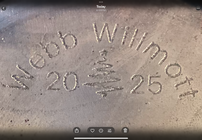
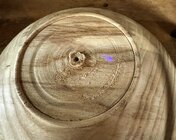
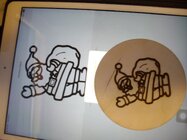
Well I set it up here on the desk and created my name and a wood name. Put in 9mm instead of 90mm and it printed in about 3 seconds or less, problem is 9mm is very very small. Yes pulled out the magnifying glass and it did a good job. Next printed the Santa from their pics, took about 12 minutes and yes on my Ipad. Only problem is that I had it an inch lower than it should be. I needed to hit the button to make it self focus which I did not do. But it printed fairly well for not being 8" away (7" actually). It was done at 50% power). So for sure it works with an I pad. I'll have to get a cable like I read and see if it will work with that cable and the desktop. While it is no speed demon it will work for what I want it to. Now to delve into the software and see what I can make it do.
 

Attachments

  • 1st Burn.JPG
    1st Burn.JPG
    210.1 KB · Views: 55
It looks pretty good Bill. I’ve been thinking about getting one and now I might pull the trigger.
 
Well the software on the computer is miles ahead of the software on the Ipad. I believe the software on the Ipad is the same as what you get on your phone. Will have to make on computer and then transfer to Ipad. Will take some learning to figure out the program on the computer. There is 3 times as much to print on the computer version than what's available on phone or Ipad.
 
I didn't see a way to drive it with a computer, so I'm just using my phone. I have a couple of extra (retired) PC laptops around and that would be more convenient. It's a clunky program on the phone, but it works.
 
I will say this I have ordered a USB C cable and it's supposed to be here today. The thing I read said the LP1 would work on the computer with a USB C. The C cable transfer rate is much much faster than a regular USB cable so I wonder. Also when I loaded the big program into the computer it gave me a choice to use LP1. So with any luck we will know in a day.
 
FWIW, I don't use the desktop app and only use the phone app to send an image to the laser. I create all my black and white images in Paint.NET. Much easier, but I have been using Paint.NET for years.
 
Did my first test run. The complete run was done with 3 separate sub runs. One for name, one for date, and one for image.

Make up a bunch of images so you don't have to do three passes. Mine are simple black and white bitmaps. If you put the year on, you will have to redo the images once a year. That will take about 20 minutes.

1765288379273.png1765288402471.png
 
I didn't see a way to drive it with a computer, so I'm just using my phone. I have a couple of extra (retired) PC laptops around and that would be more convenient. It's a clunky program on the phone, but it works.
Agreed… mine is a year old, but i was told you had to run only the proprietary software using the app from the phone. Not true for the more expensive models, but the LP1pro I’ve only been able to run from the phone app. While limited for sure, it has served me well.
 
For smaller images like a logo I find that a nice feature on the the IPad using the LP Designer App is that you can drag the image on the screen in preview mode and it will made fine adjustments to the red image box on your target so that you can get the image position exactly where you want it.

I don’t use the phone or the computer so I can’t speak to those.

Bob
 
I found the tripod almost worthless. The hard feet slid, the mount was loose, and the laser moved if you breathed on it. And the ability to aim and repeat wasn’t as easy I would have hoped for. It should not take several minutes to get it aimed.

The fix was easy, turn a post that fits in the banjo and epoxy in a cut off bolt for mounting the laser. Since the center of the tool rest hole won’t quite line up with center, I offset the bolt. Hopefully I got the height right for center of a bowl. If not, a little tweaking will be in order. I can also raise it if I’m not burning something in a circle or need the etching dead center.

You know those little pieces that you hope you’ll find a use for. The post was from a a tool handle that had a skew catch.

The epoxy is curing right now and I’ll get a chance to test for alignment tomorrow.
 

Attachments

  • IMG_7674.jpeg
    IMG_7674.jpeg
    282.2 KB · Views: 21
I found the tripod almost worthless. The hard feet slid, the mount was loose, and the laser moved if you breathed on it. And the ability to aim and repeat wasn’t as easy I would have hoped for. It should not take several minutes to get it aimed.

The fix was easy, turn a post that fits in the banjo and epoxy in a cut off bolt for mounting the laser. Since the center of the tool rest hole won’t quite line up with center, I offset the bolt. Hopefully I got the height right for center of a bowl. If not, a little tweaking will be in order. I can also raise it if I’m not burning something in a circle or need the etching dead center.

You know those little pieces that you hope you’ll find a use for. The post was from a a tool handle that had a skew catch.

The epoxy is curing right now and I’ll get a chance to test for alignment tomorrow.
 

Attachments

  • PXL_20251120_174642406.MP.jpg
    PXL_20251120_174642406.MP.jpg
    354.4 KB · Views: 24
I knew and know the power of this laser is far from the greatest but the versatility of this laser is what sold me. There are lots of fixes (as shown above) that can be done so the laser can be used in a lot of different circumstances.
 
Keep in mind, it gets its power from the USB-c connection. I got things mixed up and had it connected to a generic phone charger for a bit once. It would connect, I'd go thru the uploading and centering process to burn, but when I tried to start, it would quit almost instantly. It requires a lot of current to run the laser at burn level, so keep your AC adapter and cord with it. (not sure a computer would output enough)
 
Keep in mind, it gets its power from the USB-c connection. I got things mixed up and had it connected to a generic phone charger for a bit once. It would connect, I'd go thru the uploading and centering process to burn, but when I tried to start, it would quit almost instantly. It requires a lot of current to run the laser at burn level, so keep your AC adapter and cord with it. (not sure a computer would output enough)
Good point. I don't think I tried it with PC USB power, but I'll bet you are right.
 
After I got the software to work it wasn't an issue. I just move the banjo where it needs to be by the centering dot the laser will project.
In preview, I see the box but can’t find how to get a center dot.

I did my first burn today. I turned the power down and put some painters tape over the area until I was satisfied with the location. A center dot would be helpful.
 
In preview, I see the box but can’t find how to get a center dot.

I did my first burn today. I turned the power down and put some painters tape over the area until I was satisfied with the location. A center dot would be helpful.
yeah I think it's a very tiny very faint center dot that is hard to see - I never thought to try before but maybe try holding a plain white piece of paper over the area to see if the center dot actually is being projected - But I always just relied on the box myself because most of my badges also fit very nicely within a box formed so the points touch the ring in a 2" -ish recessed foot, or otherwise a ring made with point tool that I usually make to decorate the bottoms... so that pretty much gets it centered for me..
 
On the LP1 using their software [on an iphone]. When I hit the preview button it shows the box shape. On the lower right of the screen there is a button that says "show center". I will try to get a screen shot when I head down to the shop. One thing that sucks with this software is it needs to hook to the laser or it won't let you do anything.
 
It's hit and miss getting the centering dot to show. Just have to keep backing out and go forward till stuff starts working.
 
Well I went through hell getting that USB C cable. It was supposed to be here Tuesday even paid extra for same day delivery. So Tuesday first call to Amazon, Wednesday second and third calls with a little harsh talk. Delivered late last night. Tried it first thing this morning. The cable is defective, I even bought the most expensive one, absolutely dead. Tried it on four devices, dead, dead, dead, dead. Now just because I read all above before typing this after the cable disaster I tried hooking the power to the computer. Plugged the USB into a USB port on my desk top and the LP started right up, opened the Ipad got a picture and it started to print I let it print for 10 seconds and shut it off. So it works plugged into the computer but this is a USB cord. What is bothering me at the moment is that I tried it with two different power banks and I have not got either to work. The small power bank should power it enough for at least a few burns and the big power bank should be capable of powering a 24 hour burn. Will look into this later as next step is to get a hold of Silkland about this USB C cable.
 
Back
Top