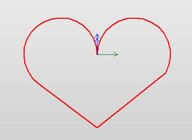
I’m using my iPad instead of phone and have not seen the center locator. It’s probably there and I’ll keep looking. Last time I used, I just placed the burn area in the correct location. Thanks Phil. Onward thru the fog.


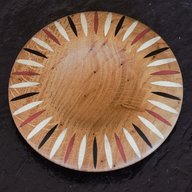
It would have been nice if the app had higher contrast colors that didn't make it nearly impossible to see with the safety glasses on.


I bought the LP2 because I wanted something faster. I plan to do a lot more than a logo. I made a box for my wife and put some pictures of our dogs on it.View attachment 82920

Speaking of those glasses, I stepped on mine. I went looking for a replacement and found mostly $40 goggles/glasses. Surely there must be some available in the $10 range. I'll keep looking.It would have been nice if the app had higher contrast colors that didn't make it nearly impossible to see with the safety glasses on.
I wonder if I have to target the specific wavelength of the laser, or if any welding glasses will do.Look at welding glasses on Amazon.
I just looked it up. And no they don’t cover the correct wavelength. Sorry, it was the first thing I thought of. I looked up the wavelength and LP is 450nm.I wonder if I have to target the specific wavelength of the laser, or if any welding glasses will do.
I wonder if I have to target the specific wavelength of the laser, or if any welding glasses will do.
 .
.
Thanks I will play with that. I think part of my problem was burning samples on different wood until I liked them. Then when I burned them on the box they came out darker.Cute pups
I have the LP2 as well.
In the designer App there is a dithering option and on that menu there is an invert slider that allows you to invert the image which would eliminate the black background. The contrast is another great option to use to clean up images on wood.
Bob
Thanks I will play with that. I think part of my problem was burning samples on different wood until I liked them. Then when I burned them on the box they came out darker.

I had come up with this when I was buying mine.I just looked it up. And no they don’t cover the correct wavelength. Sorry, it was the first thing I thought of. I looked up the wavelength and LP is 450nm.
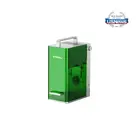
| Laser Type | 0.5W 405nm Blue-Violet Diode Laser |
Laser Type 0.5W 405nm Blue-Violet Diode Laser
They list the mini as 450 and the lp1 pro as 405. who knows??
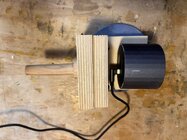
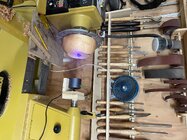
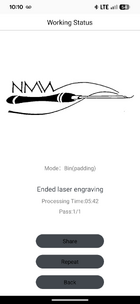
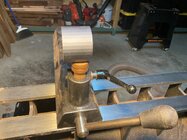
Phil, no such luck on a center button on my LP-1 app on my iPad. However, the mounting post I made for the tailstock lets me line up the burn area quite nicely.As promised pics from the iphone app.
View attachment 82725

I'm waiting for some of the turning world "influencers" to go further and show that for less than the price of the least acceptable wood lathe + tools they can become world class producers of "turnings" on relatively inexpensive CNC wood routers. A few years back I predicted CNC would become the common method of "turning" in ten years,

I would like to be around in ten years to tell you that you were wrong. My least acceptable lathe cost me $265. My CNC machine cost me $5000, I've spent another $700 learning how to use it and I've spent $1500 on cutters. That least acceptable lathe can produce a 12" wide 6" deep bowl. My CNC as much as I try to think how it could be done I cannot figure a way it could be done on a continuous piece of wood. I could do it making rings and glue ups but I already have a devise that does that. For most folks they have an interest in turning a few of us crazies have multiple interests that stretch you so far you get into the shop and you don't know what interest to play withThe use of these lasers is interesting to me. This is fairly high tech stuff and there's an apparent willingness to accept it. I kinda like this.
I'm waiting for some of the turning world "influencers" to go further and show that for less than the price of the least acceptable wood lathe + tools they can become world class producers of "turnings" on relatively inexpensive CNC wood routers. A few years back I predicted CNC would become the common method of "turning" in ten years, now I'd say sooner.

The use of these lasers is interesting to me. This is fairly high tech stuff and there's an apparent willingness to accept it. I kinda like this.
I'm waiting for some of the turning world "influencers" to go further and show that for less than the price of the least acceptable wood lathe + tools they can become world class producers of "turnings" on relatively inexpensive CNC wood routers. A few years back I predicted CNC would become the common method of "turning" in ten years, now I'd say sooner.
I so bad want to take one of the rubber wood bowls they sell in Aldis occasionally and remount it, clean it up and do some embellishments then stick it out amongst mine at a craft show but so far I don't want to spend $14 which they seem to be and my sis says it's not ethical and probably true but I want to call it an experiment and see if it would sell better. Usually they are segmented.I think the sticking point for most folks is that they like turning. There's no reason you can't do bowls, boxes, etc. on a CNC, it's just that this crowd isn't interested. Sometimes that feels like we're old, stodgy, and not interested in new things. But for me, it's just that a CNC bowl is just... well, a Chinese $10 bowl.
I think that, and especially when AI controls the CNCs, is when the die-hard turners' hand-made work will become valuable art and everything else will be fit for Walmart.
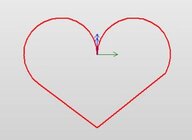
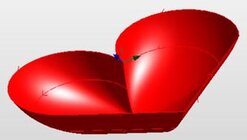
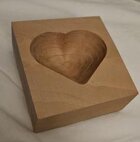
Yeah, it is a problem to do deep bowls since most CNC routers are designed with 5 to 6" work height limits. The emphasis seems to be on sign making and carved wall hanging. Not my interest though, haven't had a need for a sign or wall hanged.My CNC as much as I try to think how it could be done I cannot figure a way it could be done on a continuous piece of wood. I could do it making rings and glue ups
I've always considered the design as the art. Much like an architect's work is considered.
Here's another junk $10 Chinese bowl. "Turned" in sapele as a utilitarian object for possible use on a desk for paper clips or whatever. The 4.5" by 3.5" by 1" deep oval shape was done by CNC the only way I'm aware it could practically be done. Google tells me it has too much ovalness to be done on a Vicmarc attachment.I think the sticking point for most folks is that they like turning. There's no reason you can't do bowls, boxes, etc. on a CNC, it's just that this crowd isn't interested. Sometimes that feels like we're old, stodgy, and not interested in new things. But for me, it's just that a CNC bowl is just... well, a Chinese $10 bowl.
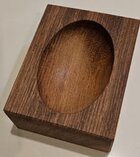
If it's an ellipse, the earliest examples I read about were from the 16th century. I've never used an ornamental lathe but I have a friend who had one. But I don't know what "too much ovalness" means or what a Vicmarc attachment is.Here's another junk $10 Chinese bowl. "Turned" in sapele as a utilitarian object for possible use on a desk for paper clips or whatever. ... the only way I'm aware it could practically be done. Google tells me it has too much ovalness to be done on a Vicmarc attachment.
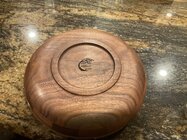
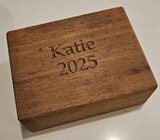
One of the hardest parts of the job was finding a piece of wood with our daughter's name on it.
If it's an ellipse, the earliest examples I read about were from the 16th century. I've never used an ornamental lathe but I have a friend who had one. But I don't know what "too much ovalness" means or what a Vicmarc attachment is.
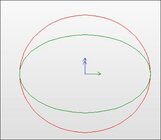

Doug, the Google information is wrong, the Vicmarc "Oval Turning Device" has a ratio of 320 to 400, or .8. That still won't get you a .6 oval, but it is "more oval" than a .9 oval. It costs about US$3,400. I don't know who wants to turn ovals enough to buy one of these, but it is an interesting piece of machinery.On edit: the Vicmarc ratio from Google's response seems very low in ovalness. I wonder if the information from Google is correct.
I went to use my lp1 today and my newer phone wouldn't even connect to Bluetooth with it, went back to an older phone and it worked. Didn't want to but I got the job done finally. Very poor software I think.Nice setup! I'll have to try hooking my Ipad to it. Doesn't make sense it would be different but I've seen other instances.
That's strange. I've used 3 different phones on mine and am currently running beta software on my Iphone 15. Haven't had any issues.I went to use my lp1 today and my newer phone wouldn't even connect to Bluetooth with it, went back to an older phone and it worked. Didn't want to but I got the job done finally. Very poor software I think.

I had a sort of similar issue when I got my new phone.. after getting the app put on new phone (via backup/transfer feature on google pixel), I tried to use it, only to have it fail to connect.. I went back to the beginning and re-installed the app, and went through setup as if I had been doing it for the first time ever, then went back to usual routine of how I normally use it and everything worked fine. Made me wonder if it was not some sort of file path issue (similar to moving a website - your configuration settings have to be tweaked after moving as file paths are not always exactly the same)I went to use my lp1 today and my newer phone wouldn't even connect to Bluetooth with it, went back to an older phone and it worked. Didn't want to but I got the job done finally. Very poor software I think.
I went to use my lp1 today and my newer phone wouldn't even connect to Bluetooth with it, went back to an older phone and it worked. Didn't want to but I got the job done finally. Very poor software I think.